Auto Blur Sensitive data
Keep phones, faces, passwords, and API keys off the model.
 SeenShot.appFast, Secure annotation App for Ai Agents
Compare Mac screenshot apps. SeenShot is free, offline Auto Blur, one-click insert in to agents.
macOS 14 or later
Keep phones, faces, passwords, and API keys off the model.
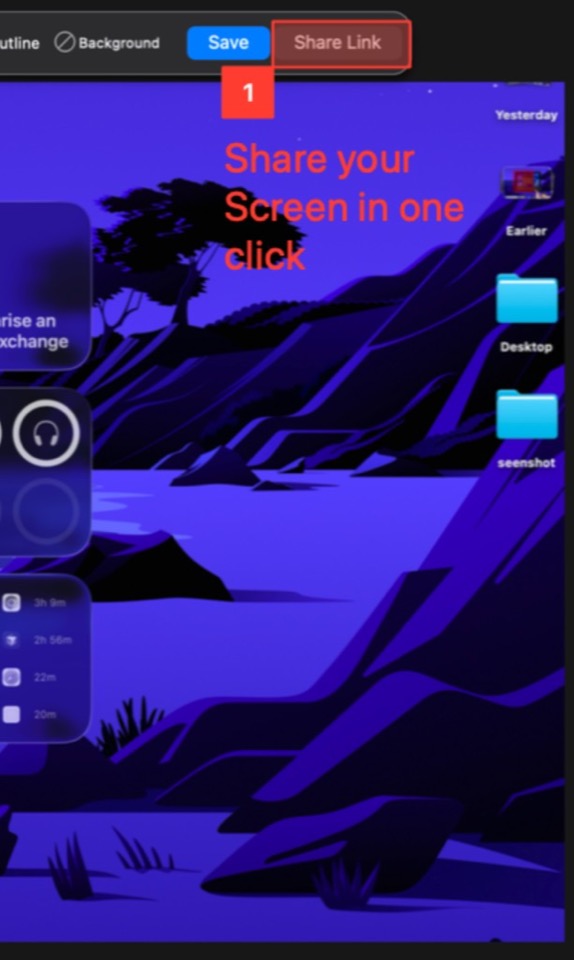
Insert the screenshot into the agents you already use.
| Feature | SeenShot | Zight | Droplr | Gyazo | Loom | CleanShot | Shottr | BlurData | Redacted |
|---|---|---|---|---|---|---|---|---|---|
| Description | Fast, Free, Secure Screenshots in Agentic Era | Capture-and-share | Capture-and-share | Capture-and-share | Capture-and-share | Screenshot utility | Screenshot utility | Desktop redaction | Desktop redaction |
| Price | Free, $29/year, Lifetime $87 | Free, Create $9.95/user/mo billed annually | Pro Plus $6/mo billed annually ($72/year) | Free, Pro $5.99/mo billed yearly ($71.88/year) | Starter $0, Business $18/user/mo | Basic $35 once, Pro $10/user/mo billed annually | Free (license on shottr.cc) | Personal $79/year or $149 once | — |
| Capture | |||||||||
| Full screen, window, and region capture | Yes | Yes | Yes | Yes | Yes | Yes | Yes | No | No |
| Scrolling / panoramic capture of long pages | No | Yes | — | — | — | — | — | No | No |
| Repeat last region and fixed-size capture | Yes | — | — | — | — | — | — | — | — |
| All-in-one capture mode behind one shortcut | Yes | — | — | — | — | — | — | — | — |
| Color picker, ruler and pixel-measure utilities | Yes | — | — | — | — | — | Yes | — | — |
| Webcam and camera capture alongside screen | Yes | — | — | — | — | — | — | — | — |
| Auto Blur | |||||||||
| Auto-blur sensitive data | Yes | — | Yes | — | — | No | — | Yes | — |
| Auto-blur faces | Yes | — | — | — | — | No | — | Yes | — |
| Auto-blur phone numbers | Yes | — | Yes | — | — | No | — | Yes | — |
| Auto-blur passwords | Yes | — | — | — | — | No | — | — | — |
| Auto-blur emails | Yes | — | Yes | — | — | No | — | Yes | — |
| Auto-blur API keys | Yes | — | — | — | — | No | — | — | — |
| AI Agents | |||||||||
| One-click export to agents | Yes | — | — | — | — | — | — | — | — |
| Supported agents | — | — | — | — | — | — | — | — | |
| Offline | |||||||||
| All features work without internet and without external APIs | Yes | No | No | No | No | Yes | — | Yes | — |
| Annotation | |||||||||
| Arrows, shapes, lines and freehand pen | Yes | Yes | Yes | Yes | Yes | Yes | Yes | No | — |
| Text, callouts and speech bubbles | Yes | Yes | — | — | — | — | — | No | — |
| Highlighter and numbered step tool | Yes | Yes | — | — | — | — | Yes | No | — |
| Styles, favorites and per-tool presets | Yes | — | — | — | — | — | — | — | — |
| Smart move / object-aware rearrange | Yes | — | — | — | — | — | — | — | — |
| Beautification & presentation | |||||||||
| Backgrounds, gradients, padding and alignment | Yes | — | — | Yes | Yes | — | — | — | — |
| OCR & content intelligence | |||||||||
| On-device OCR text extraction from captures | No | — | — | Yes | — | Yes | Yes | Yes | — |
| Searchable text across capture library | No | Yes | — | Yes | — | — | — | — | — |
| Scrolling-text capture and table extraction | No | — | — | — | — | — | — | — | — |
| AI detection of faces, plates, IDs, QR codes | Yes | — | — | — | — | — | Yes | Yes | — |
| Privacy & redaction | |||||||||
| Gaussian blur, mosaic/pixelation, solid bars | Yes | Yes | Yes | — | Yes | Yes | Yes | Yes | Yes |
| Emoji cover, watermark overlays, color choices | Yes | — | — | — | — | — | — | Yes | — |
| Auto-detect PII: emails, names, phones, addresses, accounts | Yes | — | Yes | — | — | No | — | Yes | — |
| Face and license-plate detection, group photos | Yes | — | — | — | — | — | — | Yes | — |
| Video redaction with object tracking | No | — | — | — | — | — | — | — | — |
| Automation & workflows | |||||||||
| Hotkeys for every capture and action | Yes | — | — | — | — | — | Yes | — | — |
| Watched folders and scheduled capture | No | — | — | — | — | — | — | — | — |
| CLI / scripting hooks | No | — | — | — | — | — | — | — | — |
| Sharing & collaboration | |||||||||
| Instant shareable link with hosted upload | Yes | Yes | Yes | Yes | Yes | Yes | — | No | — |
| Team & admin | |||||||||
| Centralized license and seat management | Yes | Yes | Yes | — | Yes | Yes | — | Yes | — |
| Role-based permissions and domain control | Yes | Yes | Yes | — | Yes | Yes | — | — | — |
| Performance & reliability | |||||||||
| Native performance on Apple Silicon / low memory | Yes | Yes | — | — | — | Yes | Yes | Yes | — |
| GPU-accelerated capture and encode | Yes | — | — | — | — | — | — | — | — |
| Auto-updates (notarized, Sparkle-style) | Yes | — | — | — | — | Yes | Yes | Yes | — |
| Crash recovery of unsaved captures | Yes | — | — | — | — | — | — | — | — |
| Platform | |||||||||
| MacOS Arm | Yes | Yes | Yes | Yes | Yes | Yes | Yes | Yes | Yes |
| MacOS x86 | Yes | Yes | Yes | Yes | Yes | Yes | Yes | Yes | Yes |
| Windows – in development | Yes | — | — | — | — | — | — | — | — |
| Menu-bar quick access and onboarding | Yes | — | — | — | — | — | Yes | — | — |
$29 / year
$87
Everything in Member. Pay once.
SeenShot is a free Mac screenshot app with on-device Auto Blur and one-click insert into AI agents. Capture, annotate, and send without a cloud redaction API.
The matrix scores SeenShot against Zight, Droplr, Gyazo, Loom, CleanShot, Shottr, BlurData, and Redacted on capture, Auto Blur, agents, and Mac platforms.
SeenShot is free for personal use. Member is $29 / year to remove the watermark and add 1 GB storage.
Yes. Apple Silicon and Intel. Windows is in development.